
Design
Satin
SummaryThree satin jobs: a column along a line, a column on a border, and a fill inside a shape.
Satin is the smooth, padded stitch. Embroidery Breeze uses it in three ways. Pick the one that matches the object. Construction is in Centerline and outline. The stitch menus are in Stitches and fills.
Along a line (centerline)
Line, Curve, and Draw are centerline. Border stitch Satin lays a column on that spine.
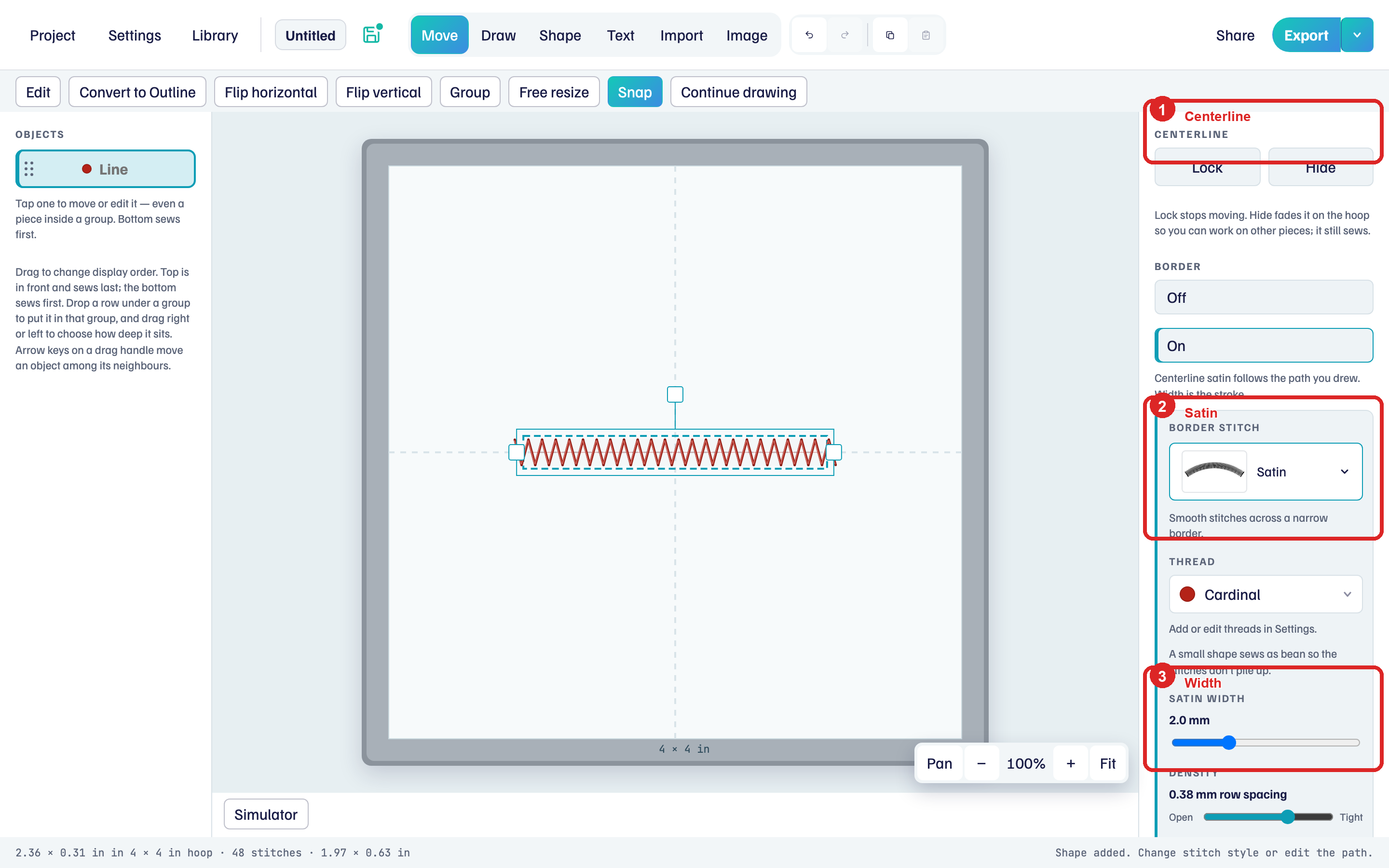
- Place a Line (or draw a stroke).
- Under Border, choose Satin.
- Drag Satin width. The column stays centered on the path.
Very small centerline satin sews as Bean so the stitches do not pile up. Centerline satin does not use a width profile along the path. For a taper, convert to an outline and use satin fill with Inclinations.
On the border (outline, fill off)
On a closed Oval, Polygon, or Star, with Fill off, satin is a column on the border.
- Select the shape. Fill Off. Border stitch Satin.
- Drag Satin width for how wide the column is.
- Inner rail edits the inner path of that column. Drag nodes so the width stays even. Done.
- Stitch Direction sets which way the stitches lean. Done.
- Reset Satin to Auto throws those edits away and rebuilds the inner path.
The hint: Satin is a column on the border. Turn Fill on to fill the inside.
Inside the shape (satin fill)
Fill type Satin or Raised satin covers the interior. Breaks (red walls) split the shape. Inclinations (teal) set stitch direction. This is the same idea as a digitized letter.
The fill has no stitches until you add a valid inclination. A Border on the same object still sews.
- Select a closed shape. Fill On. Fill type Satin.
- Click Breaks. Click Add break.
- Tap two points on the border to place a wall. Finish break when the wall is right, or tap another pair.
- Click Done.
- Click Inclinations. Click Add inclinations.
- Tap two points across a piece. Teal marks show the direction. Keep adding pairs.
- End inclinations lets you select a mark and drag its nodes.
- Click Done.
Clear under Sections removes breaks and inclinations.
Raised satin is the same, with extra padding layers under the satin.
Satin density (the Open / Tight control on a satin fill) is the space between rows.
Play Simulator after the first inclination. If the fill is blank on the hoop, add that teal mark.